
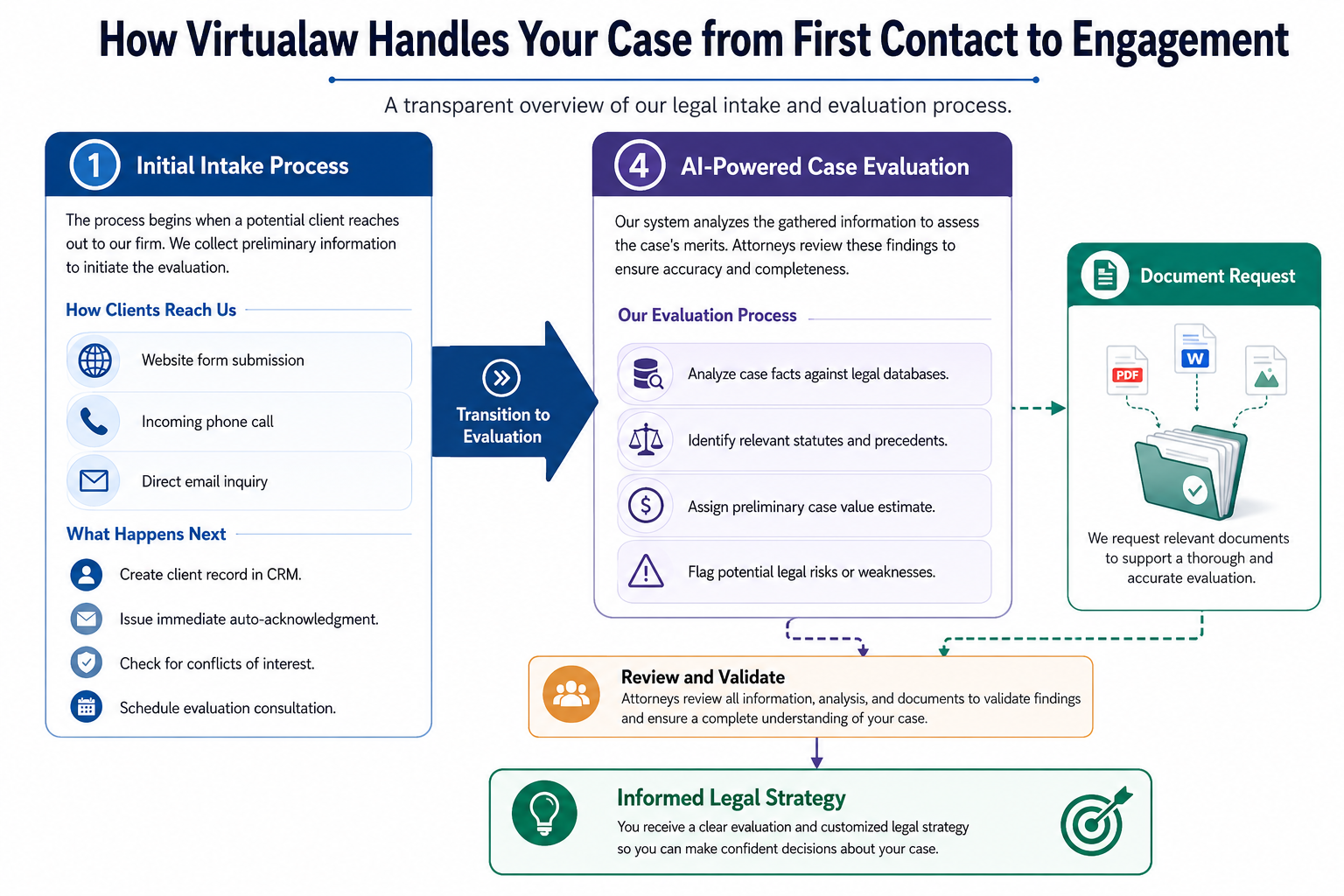
How Virtualaw Automates Legal Client Intake

How Virtualaw Automates Legal Client Intake — A 7-Stage Pipeline | Virtualaw

Virtualaw · Behind the Scenes

How Virtualaw Automates Legal Client Intake — A 7-Stage Pipeline

From first contact to signed engagement, without a single dropped ball. Seven stages, explained in depth.

Virtualaw

Legal Services, Automated from First Contact to Signed Engagement.

Virtualaw is a law firm built on automated legal infrastructure. We handle intake, evaluation, proposal drafting, and onboarding without manual handoffs — so attorneys spend their time on legal work, not administrative follow-up.

What We Do

Virtualaw practices law and builds the systems behind it. We represent clients across a range of legal matters, and we've automated the full journey from first contact to active matter — so every client gets a professional, responsive experience regardless of when they reach out.

How It Works

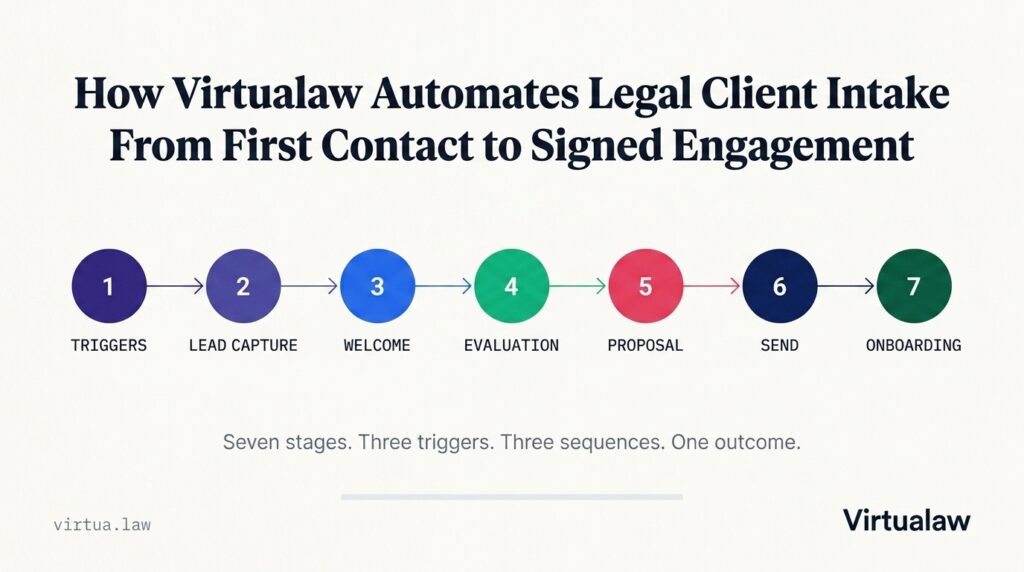
Every potential new client enters a seven-stage automated pipeline. The system captures contacts, delivers intake forms, runs AI-powered case evaluations, drafts proposals, and completes onboarding — with a single human review point before anything goes to a client.

The Principle

AI does the work. Attorneys make the calls. Nothing goes to a client without attorney review and approval. Automation handles the process. Judgment handles the law.

7

Pipeline Stages

3

Entry Triggers

3

Automated Sequences

1

Human Review Point

0

Dropped Leads

All Seven Stages


Stage 1 — Triggers

How Virtualaw Captures Every First Contact — Before Anyone Picks Up the Phone

Three entry points. Three automated paths. One system that ensures no potential client disappears — regardless of how they reached out, or when.

5 min read

Most law firms lose the lead before the second ring. The phone rings. Nobody picks up. The lead moves on. Or someone fills out a form at 11 PM and hears back three days later — if at all.

We built Virtualaw to fix that. And it starts the second a potential new client makes contact — regardless of how they reached out.

Three Ways a Client Finds Virtualaw

Every potential new client enters the pipeline through one of three entry points. Each one is handled differently. All of them converge at the same destination: the evaluation stage.

1
The Phone Call
Trigger 1 — Inbound call

A potential new client calls in. The call is logged in the CRM, an email report goes to the team, and the system asks one question: did they opt in to SMS during the call?

If yes — an email-to-SMS bridge fires and we capture their name and email by text reply. If no — they route straight into the cold lead sequence. Either way, a phone sheet is created and the Cold Lead tag is applied.

2
The Evaluation Form
Trigger 2 — Direct form completion

Some people skip the phone entirely. They find the evaluation form and complete it directly.

This path skips lead capture entirely and drops straight into the evaluation stage. The system recognizes the form completion as intent and moves faster — because the person already told us what we need to know.

3
The Contact Form
Trigger 3 — Website form submission

A potential client fills out the contact form on the website. The submission is logged immediately.

Then, at the right time — during business hours, not at 2 AM — an AI voice call fires automatically. It calls the contact, gathers intake and evaluation information, and feeds that directly into the system. No staff required for the first conversation.

What Fires on Every First Contact

Regardless of which trigger a contact came through, the system immediately executes four actions:

Automated Actions on Contact
All four fire simultaneously
  • Contact logged in the CRM automatically
  • Email report sent to the team
  • Cold lead phone sheet created for follow-up
  • Intake sequence begins

The principle behind Stage 1

"The system moves the moment you do. Every contact is captured, tagged, and moving forward — before anyone on the team has to do anything manually."
Where Stage 1 fits in the pipeline
  • Stage 1 — Triggers You are here
  • Stage 2 — Lead Capture
  • Stage 3 — Welcome / Intake
  • Stage 4 — AI-Powered Case Evaluation
  • Stage 5 — Proposal
  • Stage 6 — Send Proposal
  • Stage 7 — Onboarding

What comes next

Stage 2 covers Lead Capture — how the Cold Lead tag fires the welcome sequence, how the SMS opt-in branch works, and how the AI voice call collects intake information without a single staff member picking up a phone.
Stage 2 — Lead Capture

How Virtualaw Turns a Cold Contact Into an Evaluated Lead — Automatically

A tag fires. A sequence begins. From a raw contact record to a fully tagged, sequenced prospect — without a single manual step from the team.

5 min read

The first contact is logged. The record exists. But a record sitting in a database doesn't help anyone. Stage 2 is where the system takes that raw contact and turns it into an active lead with a sequence behind it.

The Cold Lead Phone Sheet

1
A Cold Lead Phone Sheet Is Created
Built for manual follow-up when needed

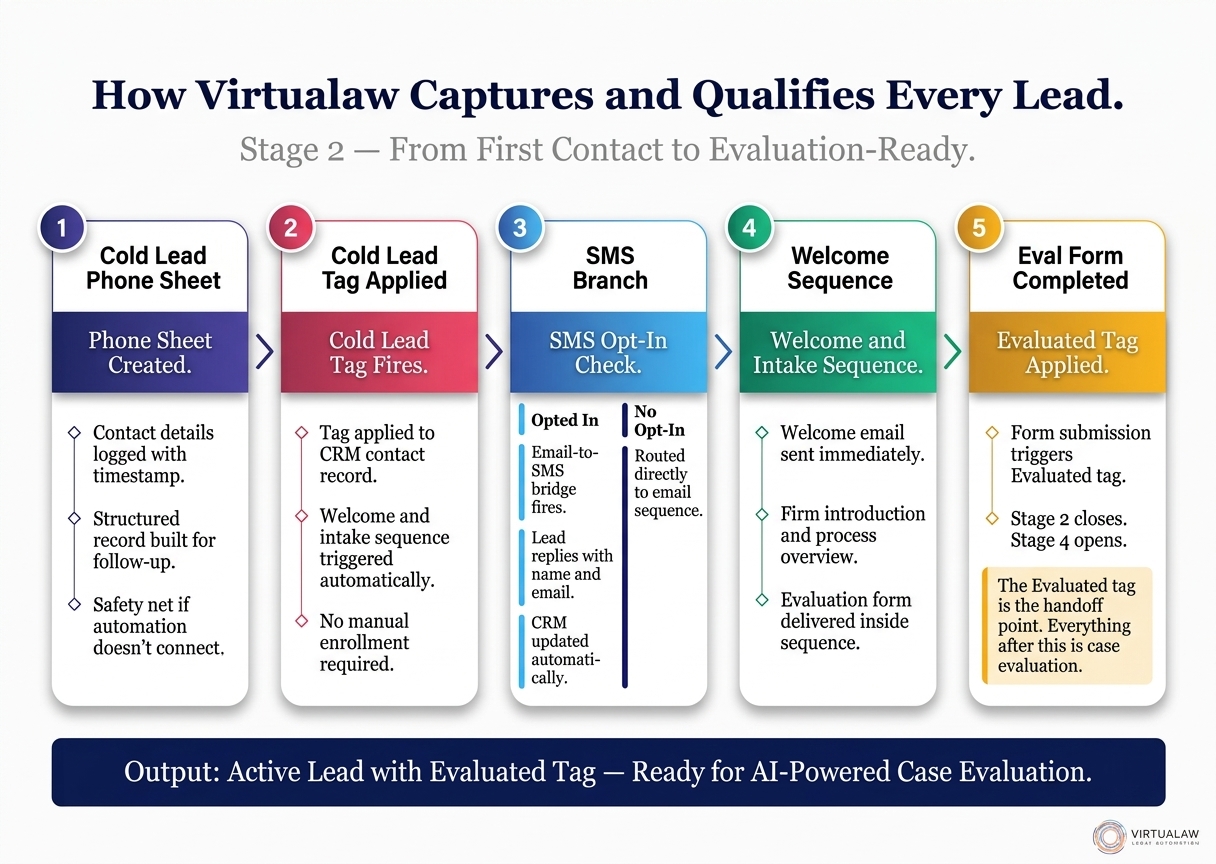
The moment a new contact enters the system through a phone call, a cold lead phone sheet is generated. Name, number, source, time of call — organized for follow-up. It exists so that if the automated sequence doesn't fully connect, a team member has everything they need to pick up the phone.

Automation runs first. The phone sheet is the safety net.

The Cold Lead Tag

2
The Cold Lead Tag Is Applied
The trigger that starts everything

A tag called Cold Lead is applied to the contact record in the CRM. This is not just a label — it's a trigger. The moment that tag lands on a contact, the welcome and intake sequence fires automatically. No one has to remember to send anything. No one has to manually enroll the lead in a follow-up flow.

The tag does the work.

The SMS Branch

3
The SMS Branch Fires
If the lead opted in during the call

If the lead opted in to SMS during the call, a separate branch opens. An email-to-SMS bridge fires immediately — a message goes out asking for a reply with their name and email address. When they reply, that information is captured and added to the contact record automatically.

If they didn't opt in, the system skips the SMS branch entirely and routes the contact straight into the welcome sequence through email. Either path leads to the same place.

The Welcome and Intake Sequence

4
The Welcome and Intake Sequence Begins
Fired automatically by the Cold Lead tag

The welcome and intake sequence is the first real communication the system has with a potential new client. It introduces the firm, sets expectations, and delivers the evaluation form.

  • Welcome email sent immediately on tag trigger
  • Firm introduction and process overview delivered
  • Evaluation form included in the sequence
  • Completion of the form moves the contact to Stage 4

Evaluation Form Completed — Stage 2 Closes

5
Evaluated Tag Applied
The handoff from Stage 2 to Stage 4

When the evaluation form is submitted, the system applies the Evaluated tag to the contact record. That single action closes Stage 2 and opens Stage 4 — the AI-powered case evaluation.

The Evaluated tag is the handoff. Everything before it is lead capture. Everything after it is case evaluation.

What Stage 2 delivers

"A cold contact becomes a tagged, sequenced, and evaluated lead — without a single manual step from the team."
Where Stage 2 fits in the pipeline
  • Stage 1 — Triggers
  • Stage 2 — Lead Capture You are here
  • Stage 3 — Welcome / Intake
  • Stage 4 — AI-Powered Case Evaluation
  • Stage 5 — Proposal
  • Stage 6 — Send Proposal
  • Stage 7 — Onboarding

What comes next

Stage 3 covers the Welcome and Intake sequence in detail — how it fires, what it delivers, and how the evaluation form inside it closes Stage 3 and opens the AI evaluation engine.


Stage 3 — Welcome / Intake

The Legal Intake Sequence That Runs Itself — Virtualaw Stage 3

A cold lead who just called is warm for minutes, not days. Stage 3 fires the moment the tag lands — before the lead has time to move on.

5 min read

You've been tagged as a Cold Lead. The phone sheet exists. The CRM record is live. And now the system has fired its first real communication.

Stage 3 is where Virtualaw introduces itself — and starts gathering what it needs to evaluate a case properly. This stage has one job: get the evaluation form into the right hands, and get it back.

Five Steps in Stage 3

1
The Sequence Fires the Moment the Tag Lands
No delay. No manual trigger.

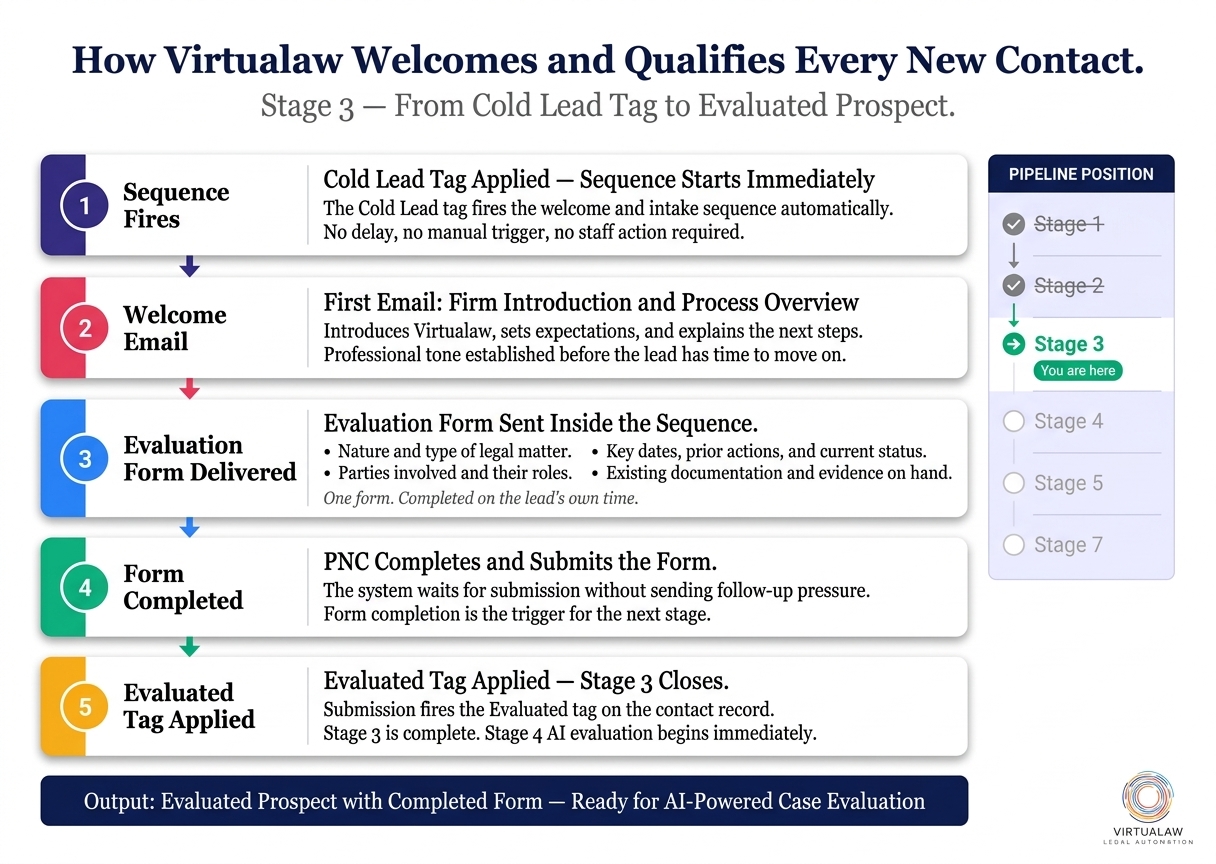
The Cold Lead tag is the trigger. The moment it's applied to a contact record, the welcome and intake sequence begins. There's no delay, no queue, no person hitting send.

A cold lead who just called is warm for minutes, not days. The system moves accordingly.

2
The First Email Introduces the Firm
Setting expectations from the first touch

The welcome email is not a generic autoresponder. It introduces Virtualaw specifically — who we are, what we do, and what the process looks like from here. It tells the potential client what to expect, how long things take, and what they'll need to provide.

The lead hears from us before they've had time to move on.

3
The Evaluation Form Is Delivered
The only form in the sequence

The evaluation form is the heart of Stage 3. It's not a generic contact form — it's a focused set of questions built to give attorneys everything they need before a single billable minute is spent.

  • Nature and type of legal matter
  • Parties involved and their roles
  • Key dates, prior actions, and current status
  • Existing documentation and evidence on hand
4
The PNC Completes and Submits the Form
The system waits. The lead decides.

The system doesn't chase. The sequence delivers the form and waits. When the lead is ready — whether that's an hour after the call or two days later — they complete and submit on their own terms.

That submission is the signal. The system recognizes the completion and moves immediately.

5
The Evaluated Tag Is Applied
Stage 3 closes. Stage 4 opens.

Form submission triggers the Evaluated tag. That tag closes Stage 3 entirely and hands the contact off to Stage 4 — the AI-powered case evaluation engine.

Stage 3 has one output: a contact tagged Evaluated, with a completed form on file. That's all Stage 4 needs to begin.

What Stage 3 delivers

"A cold lead becomes an evaluated prospect — without anyone on the team sending a single email or making a single follow-up call."
Where Stage 3 fits in the pipeline
  • Stage 1 — Triggers
  • Stage 2 — Lead Capture
  • Stage 3 — Welcome / Intake You are here
  • Stage 4 — AI-Powered Case Evaluation
  • Stage 5 — Proposal
  • Stage 6 — Send Proposal
  • Stage 7 — Onboarding

What comes next

Stage 4 covers AI-Powered Case Evaluation — how the system reads documents, assesses legal merit, estimates fees, and generates a PNC Report for the reviewing attorney.


Stage 4 — AI Evaluation

AI-Powered Case Evaluation at Virtualaw — How We Assess Every Matter Before an Attorney Reads a Word

Document review. Legal merit analysis. Fee estimation. PNC Report. All automated. By the time the attorney opens the file, the work is already done.

6 min read

Reaching the evaluation stage means one thing: your case is being taken seriously. The intake is done. Your information is in the system. Now the work begins.

This is where Virtualaw separates itself. Most firms make you wait days for a call that tells you nothing. Here, an AI-powered evaluation engine goes to work on your file the moment the Evaluated tag is applied.

The Five-Step Evaluation Process

1
Document Review
What the system reads first

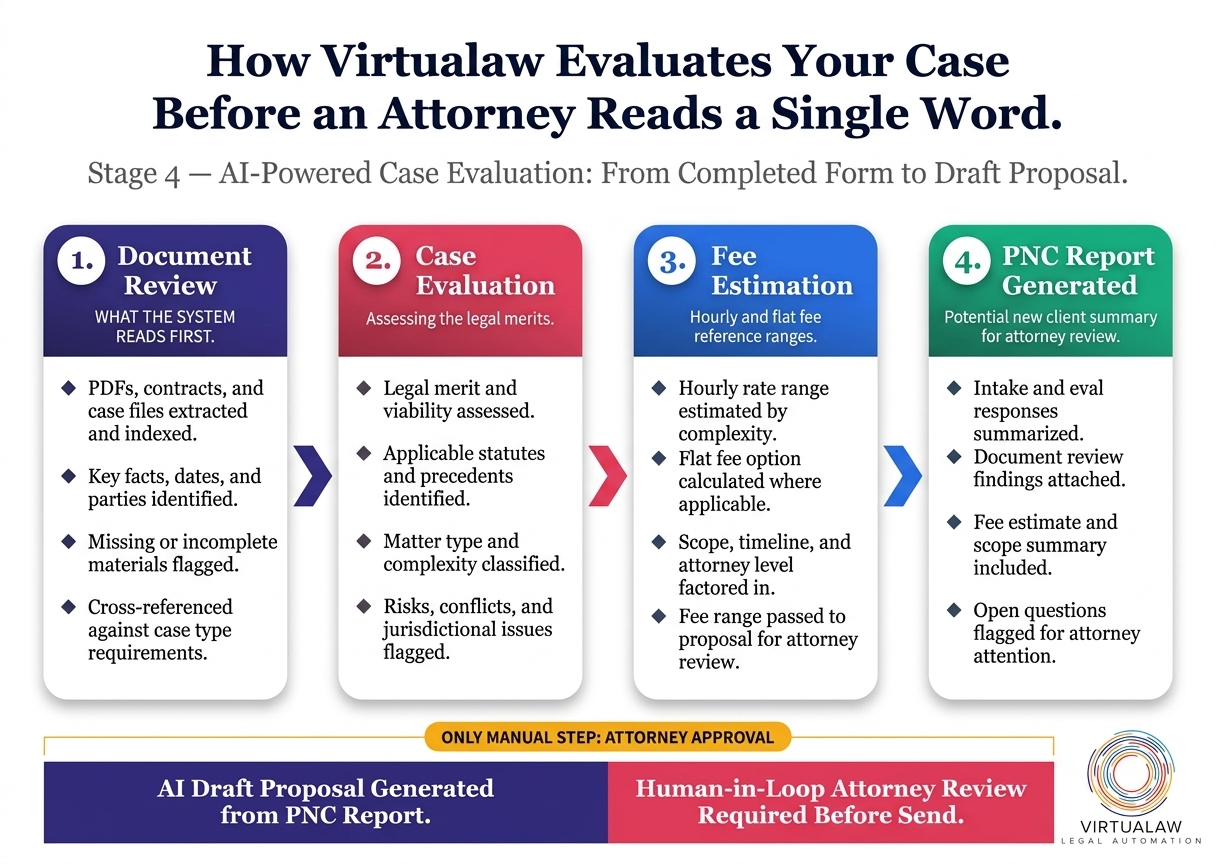
Every document submitted is read, extracted, and indexed. The system identifies key dates, parties, legal instruments, and factual claims. It flags anything missing and notes it for attorney review.

  • PDFs, contracts, and case files extracted and indexed
  • Key facts, dates, and parties identified
  • Missing or incomplete materials flagged
  • Cross-referenced against case type requirements
2
Law Firm Evaluation
Assessing the legal merits

The evaluation engine applies firm-specific criteria to the matter. It assesses legal merit, identifies applicable statutes and precedents, classifies the complexity of the case, and surfaces any conflicts of interest or jurisdictional issues that need attorney attention.

  • Legal merit and viability assessed
  • Applicable statutes and precedents identified
  • Matter type and complexity classified
  • Risks, conflicts, and jurisdictional issues flagged
3
Fee Estimation
Hourly and flat fee reference ranges

Based on the complexity classification and scope of work identified, the system generates a fee estimate for reference. It accounts for the attorney level required, estimated hours, and whether a flat fee or hourly structure is more appropriate for the matter.

  • Hourly rate range estimated by complexity
  • Flat fee option calculated where applicable
  • Scope, timeline, and attorney level factored in
  • Fee range passed to proposal for attorney review
4
PNC Report Generated
Potential new client summary for attorney review

Everything the system has gathered is compiled into a single PNC Report. This goes directly to the reviewing attorney — giving them everything they need to understand the situation before writing a word of the proposal.

  • Intake and eval responses summarized
  • Document review findings attached
  • Fee estimate and scope summary included
  • Open questions flagged for attorney attention
5
Proposal Drafted by AI
Attorney reviews before anything is sent

Using the PNC Report as its source, the system drafts a service proposal. The draft goes to the attorney for review — not to the client. The attorney reads the PNC Report alongside the draft, adjusts, approves, and signs off. Only then does the proposal leave the firm.

This is the only manual step in the entire evaluation process. Every other step runs automatically.

The result

"By the time an attorney reads your file, the system has already done the work. The evaluation is complete. The fee structure is clear. The proposal is written."
Where Stage 4 fits in the pipeline
  • Stage 1 — Triggers
  • Stage 2 — Lead Capture
  • Stage 3 — Welcome / Intake
  • Stage 4 — AI-Powered Case Evaluation You are here
  • Stage 5 — Proposal
  • Stage 6 — Send Proposal
  • Stage 7 — Onboarding

What comes next

Stage 5 covers the Proposal — how the AI synthesizes the PNC Report into a client-ready document, what the optional consultation step looks like, and how the Human-in-Loop attorney review works.


Halfway through the pipeline

Your case has just been evaluated. A proposal is being drafted.

If you have a legal matter and want to see what the evaluation stage produces for your specific situation, start a conversation with the Virtualaw team now.

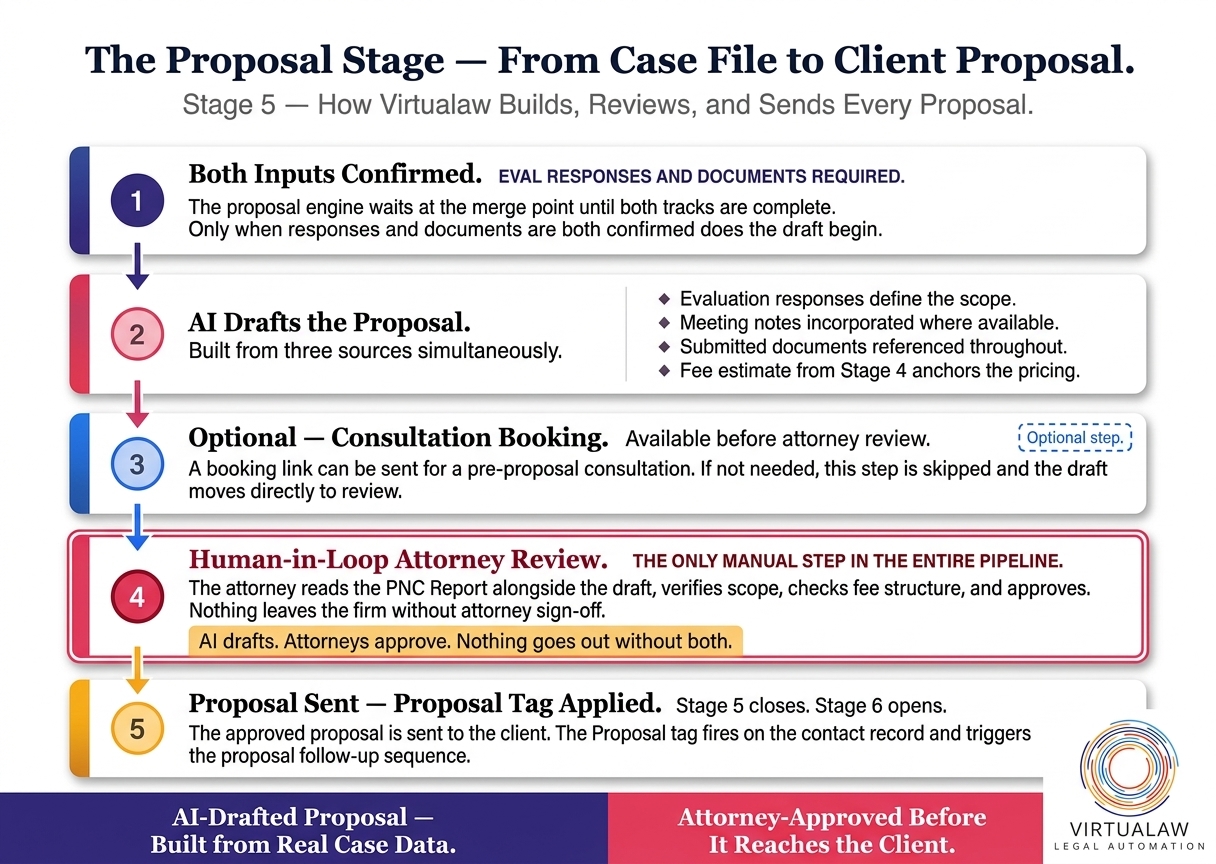
Stage 5 — Proposal

How Virtualaw Drafts a Legal Proposal Before the Attorney Opens Their Inbox

AI builds the draft from the client's actual case data. The attorney reviews it. Nothing goes to the client without both. Most firms take weeks — this happens before anyone opens their inbox.

5 min read

The evaluation is done. The AI has read the form responses, reviewed the documents, and cross-referenced everything against the legal assessment. Now it does something most firms take weeks to produce manually.

It drafts the proposal.

The Proposal Stage, Step by Step

1
Both Inputs Are Confirmed
Eval responses and documents required

The proposal draft doesn't fire until both tracks are complete. Evaluation form responses need to be in. Documents need to be in. The system waits at the merge point until both are confirmed, then moves.

This is what makes the proposal specific — not a template filled with guesses, but a draft built from actual information.

2
AI Drafts the Proposal
Built from three sources simultaneously

The AI pulls from three sources simultaneously to build the proposal draft: evaluation responses, any meeting notes on file, and the documents submitted. It synthesizes them into a structured service proposal that reflects the actual scope of the matter.

  • Evaluation responses used to define scope
  • Meeting notes incorporated where available
  • Submitted documents referenced throughout
  • Fee estimate from Stage 4 anchors the pricing
3
Optional: Consultation Booking
Available before the proposal is sent

Optional step. Before the proposal goes to attorney review, a booking link can be sent for a pre-proposal consultation. If not needed, this step is skipped entirely and the draft moves straight to attorney review.

4
Human-in-Loop Review
The only manual step in the entire pipeline

The drafted proposal goes to the reviewing attorney. Not to the client — to the attorney. They read the PNC Report alongside the draft, verify the scope, check the fee structure, and confirm the legal framing is accurate for this specific matter.

AI drafts. Attorneys approve. Nothing goes out without both.
5
Proposal Sent — Proposal Tag Applied
Stage 5 closes. Stage 6 begins.

Once the attorney approves, the proposal is sent. The Proposal tag is applied to the contact record, triggering the proposal follow-up sequence — Sequence 2.

The Proposal tag is the handoff to Stage 6 — Send Proposal — and the onboarding sequence that follows.

What Stage 5 delivers

"A proposal built from the client's actual case file, reviewed by an attorney, and sent only after human approval. Not a template. Not a guess."
Where Stage 5 fits in the pipeline
  • Stage 1 — Triggers
  • Stage 2 — Lead Capture
  • Stage 3 — Welcome / Intake
  • Stage 4 — AI-Powered Case Evaluation
  • Stage 5 — Proposal You are here
  • Stage 6 — Send Proposal
  • Stage 7 — Onboarding

What comes next

Stage 6 covers what happens the moment the proposal lands in the client's inbox — Sequence 2, the onboarding form, payment collection, and the three parallel outputs that fire when the client says yes.


Stage 6 — Send Proposal

What Happens When a Client Accepts a Virtualaw Proposal — Invoice, Documents, and First Meeting in Parallel

The attorney approved it. The proposal landed. Now — invoice, signed documents, and a booked first meeting, all fired simultaneously the moment a client says yes.

5 min read

The attorney has reviewed the draft and signed off. The proposal has been sent. This is the moment the pipeline has been building toward since the first contact.

Here's what Stage 6 looks like — and what happens the moment a client decides to move forward.

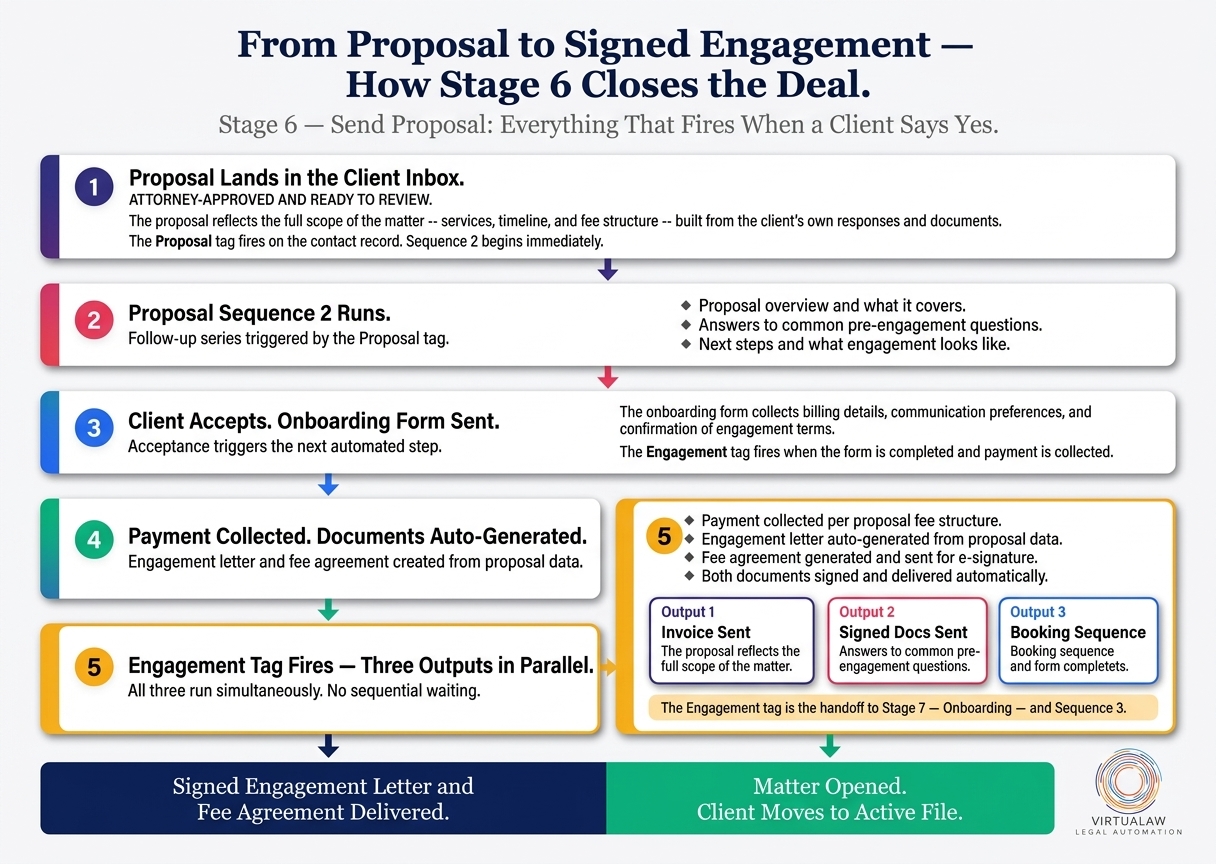
From Proposal Sent to Signed Engagement

1
The Proposal Lands in the Client's Inbox
Attorney-approved and ready to review

The proposal arrives as a structured document reflecting the full scope of the matter — services, timeline, and fee structure. Everything in it came from the client's own responses and documents.

The Proposal tag is applied to the record the moment it's sent. Sequence 2 is already running in the background.

2
Proposal Sequence 2 Runs
Follow-up series triggered by the Proposal tag

Sequence 2 is a focused follow-up series designed to answer questions, reinforce the engagement, and give the client everything needed to make a confident decision.

  • Proposal overview and what it covers
  • Answers to common pre-engagement questions
  • Next steps and what engagement looks like
  • Direct line to the team for any questions
3
Client Accepts — Onboarding Form Arrives
Acceptance triggers the next automated step

When the client accepts the proposal, an onboarding form is sent automatically. It collects billing details, communication preferences, and confirmation of engagement terms. The Engagement tag fires when the form is completed and payment is collected.

4
Payment Collected — Documents Generated
Engagement letter and fee agreement auto-generated

Payment is collected based on the fee structure in the proposal. The engagement letter and fee agreement are generated automatically from the proposal data and sent for e-signature. No staff member has to draft, format, or send them manually.

  • Payment collected per proposal fee structure
  • Engagement letter auto-generated from proposal data
  • Fee agreement generated and sent for e-signature
  • Both documents signed and delivered automatically
5
Three Outputs Fire in Parallel
Engagement tag triggers everything simultaneously

The Engagement tag fires three outputs at once. All three run in parallel — no sequential waiting, no manual coordination.

  • Output 1 — Invoice Sent: Generated and delivered to the client automatically
  • Output 2 — Signed Docs Sent: Engagement letter and fee agreement delivered to both parties
  • Output 3 — Booking Sequence: Onboarding booking sequence fires to schedule the first meeting
The Engagement tag is the handoff to Stage 7 — Onboarding — and Sequence 3.

What Stage 6 delivers

"From a sent proposal to a signed engagement — invoice, documents, and onboarding booking all handled automatically the moment the client says yes."
Where Stage 6 fits in the pipeline
  • Stage 1 — Triggers
  • Stage 2 — Lead Capture
  • Stage 3 — Welcome / Intake
  • Stage 4 — AI-Powered Case Evaluation
  • Stage 5 — Proposal
  • Stage 6 — Send Proposal You are here
  • Stage 7 — Onboarding

What comes next

Stage 7 is Onboarding — Sequence 3 fires on the Engagement tag, the matter is officially opened, and the client moves from prospect to active file. That's the final stage of the pipeline.


Stage 7 — Onboarding

Virtualaw Onboarding — How a Signed Engagement Becomes an Active Client Matter

Seven stages. Three triggers. Three sequences. One outcome: a signed, onboarded client with a paid invoice, executed documents, and a scheduled first meeting — without a single manual step.

5 min read

The engagement form is complete. Payment is in. The documents are signed. The Engagement tag has been applied to the record — and that tag just opened Stage 7.

This is the final stage of the pipeline. From a cold call or a contact form to a signed, active client file. Here's exactly what happens now.

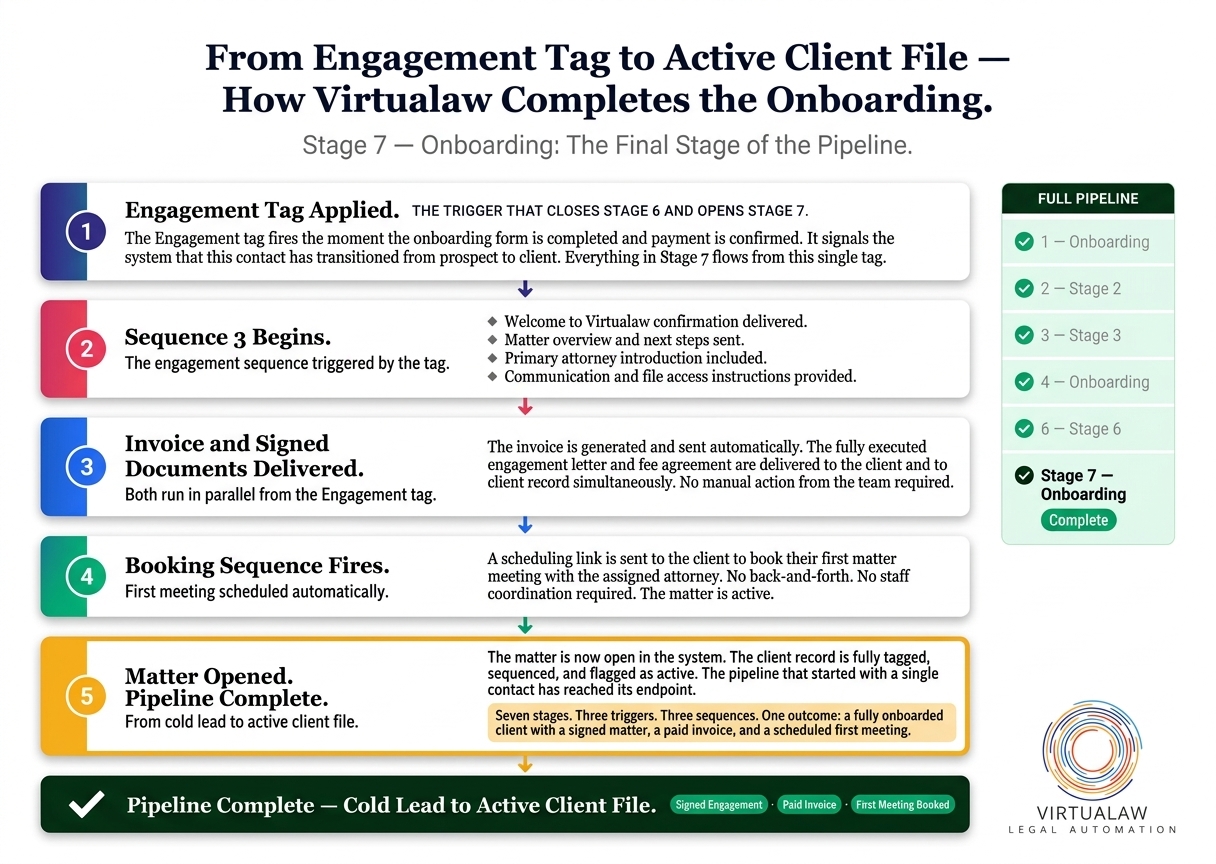
The Final Stage

1
The Engagement Tag Fires
The trigger that closes Stage 6 and opens Stage 7

The Engagement tag is applied the moment the onboarding form is completed and payment is confirmed. It's the final tag in the pipeline — the signal that this contact has transitioned from prospect to client.

Everything in Stage 7 flows from this single tag.

2
Sequence 3 Begins
The engagement sequence triggered by the tag

Sequence 3 is the engagement sequence — the third and final automated series in the pipeline. It fires immediately on the Engagement tag and runs through the onboarding phase.

  • Welcome to Virtualaw confirmation delivered
  • Matter overview and next steps sent
  • Primary attorney introduction included
  • Communication and file access instructions provided
3
Invoice Sent — Signed Docs Delivered
Both run in parallel from the Engagement tag

The invoice goes out automatically — formatted, addressed, and sent without any manual action from the team. Simultaneously, the fully executed engagement letter and fee agreement are delivered to the client and the client record.

Both outputs run the moment the Engagement tag fires. By the time anyone on the team opens their inbox, the client already has their paperwork.

4
Booking Sequence Fires
First meeting scheduled automatically

A scheduling link is sent to the client to book their first matter meeting with the assigned attorney. No back-and-forth. No coordination required from staff.

The first meeting is booked. The matter is active. The relationship has officially started.

5
Matter Opened — Pipeline Complete
From cold lead to active client file

The matter is now open in the system. The client contact record is fully tagged, sequenced, and flagged as active. The pipeline that started with a single phone call, form submission, or contact has reached its endpoint.

Seven stages. Three triggers. Three sequences. One outcome: a fully onboarded client with a signed matter, a paid invoice, and a scheduled first meeting.

What the pipeline delivers

"A cold contact becomes a signed, onboarded client — with a paid invoice, executed documents, and a scheduled first meeting — without a single manual step from the team."
The complete pipeline — all seven stages
  • Stage 1 — Triggers
  • Stage 2 — Lead Capture
  • Stage 3 — Welcome / Intake
  • Stage 4 — AI-Powered Case Evaluation
  • Stage 5 — Proposal
  • Stage 6 — Send Proposal
  • Stage 7 — Onboarding Complete

The Pipeline, Complete

Seven stages, built to move a potential new client from first contact to active matter without anyone dropping the ball, forgetting to follow up, or waiting for a teammate to take action.

The system runs it. The attorneys review what matters. The clients get a professional experience from the first touch to the signed engagement.

Not AI as a gimmick. AI as infrastructure.

Virtualaw

Virtualaw — Legal Services Built on Automated Infrastructure

AI-powered intake, evaluation, and onboarding. Attorney-reviewed at every step. virtua.law

Ready to put your matter in motion?

The system is ready. The team is standing by. Start with a conversation.

Chat Now